
Show me the file shapes
After we discuss fit, share sanitized sample exports. We confirm columns, dates, campaign identity, supported USD fields and what each metric means.
CUSTOM AD REPORTING · ONE-TIME PILOT
Send sanitized sample exports and I’ll adapt the local script to your columns and one agreed reporting format. You get a checked client report, an Excel workbook and a customized workflow your team can run again.
For agency teams still joining exports, checking totals and formatting the same client report each month.
01 THE SAMPLE REPORT
Explore the headline metrics, compare channels, scan campaign results and inspect the data checks. Every number below comes from the generated sample run.
Preparing report preview…
A client-ready summary with the underlying trend and agreed definitions.
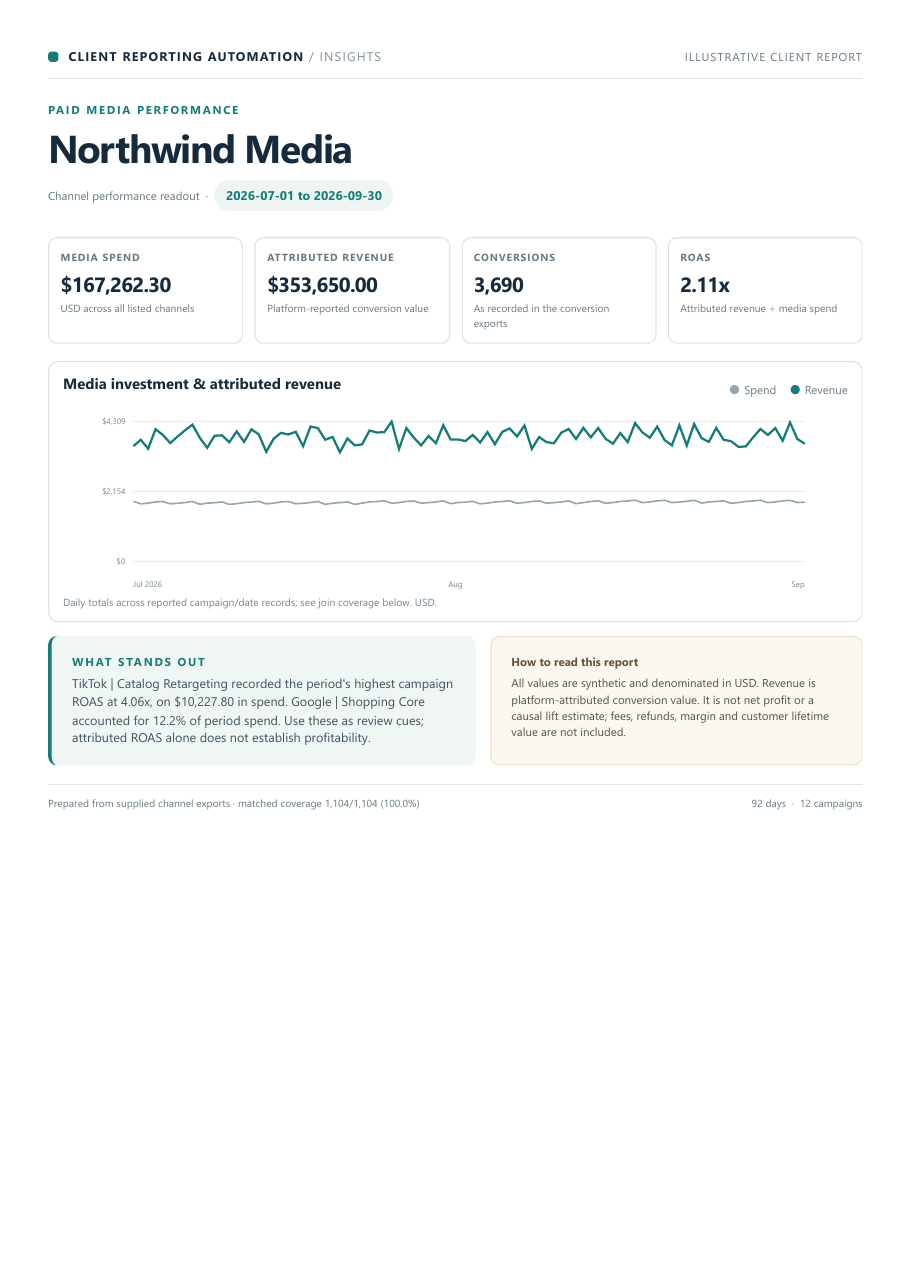
Preview of the actual sample PDF output.
THE HANDOFF
Open the finished PDF, trace the cleaned campaign/date records in Excel, and inspect the QA log that records input cleanup and coverage.
Download the sample PDF ↗Spend and outcomes roll up from the matched campaign/date records.
| Channel | Spend | Conversions | Revenue | ROAS | Campaigns |
|---|
Filter the computed results by channel. The table rolls up the daily records for each campaign.
| Campaign | Channel | Spend | Clicks | Conversions | CPA | ROAS |
|---|
Each file is checked and the run records cleanup, coverage and blocked conditions.
A mapping conflict is blocked instead of guessed. Open the QA sample for the exact message.
Read the blocked-run exampleLoading the precomputed output from the local sample run. No file is uploaded or processed in your browser.
PRODUCT WALKTHROUGH
A short walkthrough of the sample workflow, its checks and its finished PDF and spreadsheet.
Open the walkthrough video02 THE WORK
This pilot includes hands-on setup: I map your sample columns, configure the checks and shape one agreed report, then hand back a workflow tailored to those inputs.
After we discuss fit, share sanitized sample exports. We confirm columns, dates, campaign identity, supported USD fields and what each metric means.
I configure the field mapping, checks and report layout around your samples and agreed rules. You review the source-of-truth, keys and calculations before the first run.
Receive the client-ready PDF, a reviewable workbook, the QA record and your customized local script with a concise guide to rerun it.
One agreed report with headline results and campaign or channel breakdowns for spend, clicks, conversions, revenue and agreed rates when the source data supports them.
Report view and normalized rows make it possible to trace summary figures back to the cleaned campaign/date data.
Input formats, repeated rows, field mappings and match coverage appear in the run record; unresolved ambiguity stops the report.
The local workflow keeps the agreed mappings and report steps, with a concise handoff guide so your team can run it again. No monthly software subscription is part of this pilot.
Multiple exports are welcome when they fit the same report. There is no fixed two-file limit. The inputs must be compatible CSVs with supported USD fields and an agreed campaign/date identity. This workflow does not settle differences in platform attribution.
03 THE PILOT
Share sanitized samples after we discuss fit. I adapt the script’s field mappings, checks and report layout to compatible USD exports and agreed campaign/date keys. New features, currency conversion or attribution decisions need a separate scope.
US$149
One-time setup, including a customized local workflow and its first client-ready run.
Planned price for the first three satisfactory pilots. Future price and willingness to pay are still being validated. After that: planned US$249 for the same scope.
No payment to discuss fit. No account login or sensitive client data by email.
04 GOOD TO KNOW
A useful report needs agreed definitions and compatible inputs. Here is what this first pilot does and does not cover.
Yes, there is no fixed file-count limit. Multiple compatible CSVs can be consolidated when their fields, USD currency and campaign/date keys support the same report. We review those details before confirming scope.
The workflow applies agreed keys and calculations. It does not determine which platform's attribution is right or reconcile different attribution rules. Any source-of-truth decision must be supplied and approved before implementation.
No account logins or live connections are needed. The delivered workflow runs locally. Start by describing the reporting step; only share sanitized sample exports after we have discussed fit. Do not email credentials or sensitive client data.
The handoff includes the approved local workflow and rerun instructions. It is not a hosted service, scheduled automation or ongoing subscription.
The run records coverage and blocks incomplete matches by default. A partial result needs your approval and carries a visible warning. Conflicting values for the same key must be resolved before they are combined; a zero-match report is always blocked.
NEXT STEP
Tell me how often you prepare the report, which channels are involved and where the manual work happens. We’ll first discuss fit; then I’ll explain how to share sanitized samples so I can customize the local workflow. Please don’t attach files or credentials to the first message.